TrackHound

ProductsDiese Seite auf Deutsch

OTTO Market integration for Shopify

Publishes Shopify products to OTTO Market, keeps stock and prices in sync, imports OTTO orders and confirms shipments from Shopify.

Otto Connect for ShopifyShopify App StoreIn development

Tell me when it's liveDocumentation

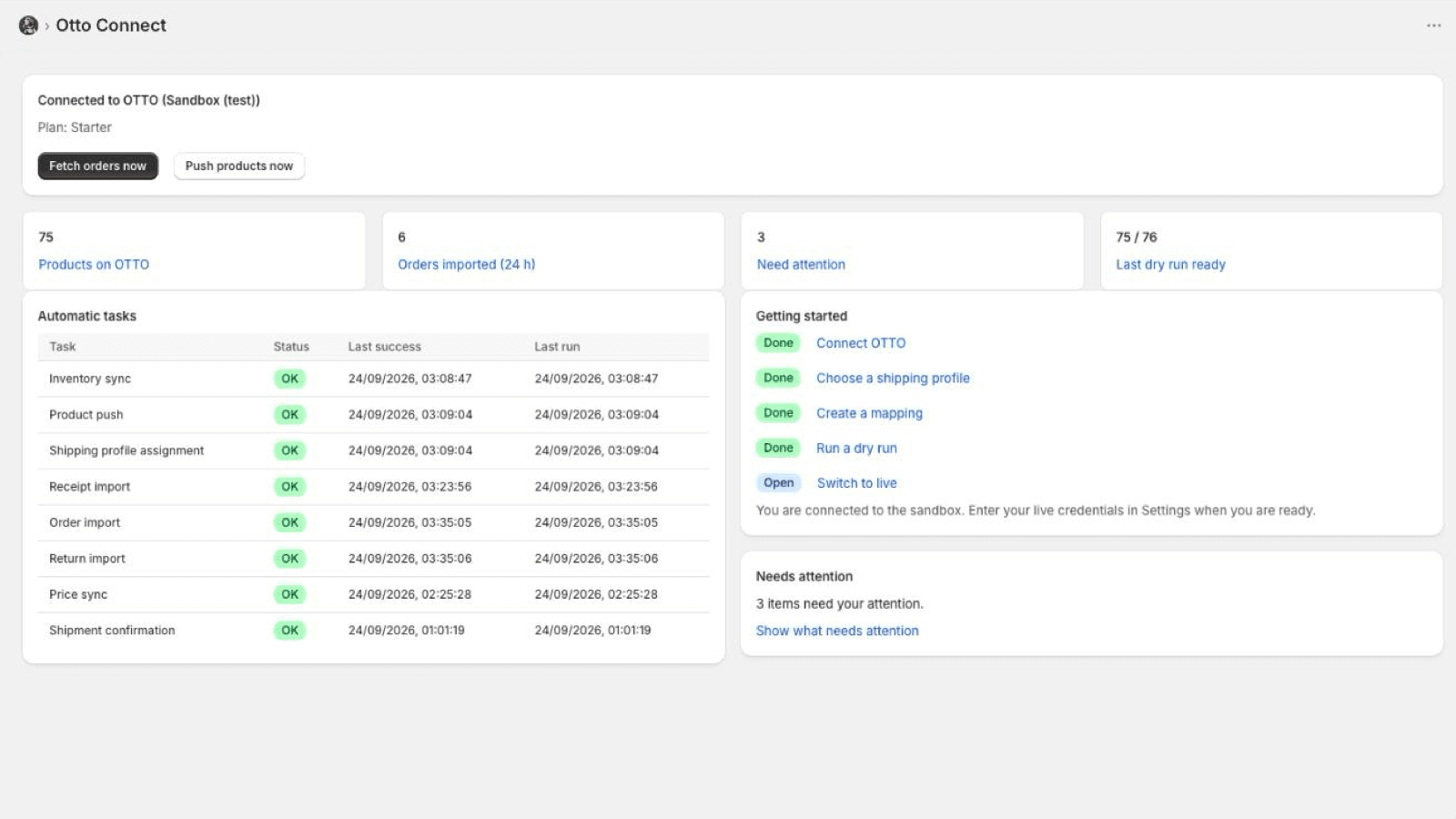
Otto Connect overview in Shopify: connected to OTTO, key figures, automatic tasks and the getting-started checklist

OTTO Market needs an EAN, an OTTO category with its mandatory attributes, a known brand and product-safety data on every product. Otto Connect maps your Shopify products to those rules with a visible mapping editor, and runs a dry run that shows exactly what OTTO would reject before anything is sent.

Orders arrive in Shopify with the OTTO order number, VAT per line, shipping costs and a normalised German address, including Packstation. When you fulfil in Shopify, the shipment and tracking number go back to OTTO with the carrier. Cancellations flow both ways; returns that OTTO registers are imported into Shopify.

OTTO only sells an item once it is assigned to an OTTO shipping profile. In Settings you pick one of your OTTO shipping profiles or create one in the app, and every transferred item is assigned to it automatically. The invoices and credit notes OTTO issues on your behalf are imported every 30 minutes; the Receipts page shows them with PDF download. For shipped items that were not returned, you refund part of the price from the Price reduction page.

Every failure is explained in German or English with the action that fixes it, and a health view shows when each feed last succeeded. A safe mode stops the app from zeroing your OTTO stock by accident.

What it does

  • Category and attribute mapping with a dry run against OTTO's rules
  • Stock and price sync that only sends what changed, with safe mode
  • Order import with VAT, address normalisation and Packstation support
  • Shipment confirmation with carrier detection for DHL, DHL Express, Hermes, DPD, GLS and UPS
  • Cancellations in both directions; OTTO returns imported into Shopify
  • Pick or create an OTTO shipping profile, every item assigned automatically
  • OTTO receipts imported every 30 minutes, with PDF download on the Receipts page
  • Price reductions on shipped, not returned items from inside the app
  • Support in German or English from the people who build it

What it does not do

  • OTTO Market accepts sellers with a company in DE, NL, PL, AT, FR or ES and German-language customer service
  • OTTO issues customer invoices itself; the app does not generate invoices for OTTO orders
  • Refunds made in Shopify are not forwarded to OTTO; partial refunds go through the Price reduction page

One round trip, three screens

Everything OTTO Market demands of a listing happens inside Shopify, in the order you use it.

  1. Mapping page: rule Jacke to Outdoorjacke with attribute rows

    1Map

    Rules turn your product types into OTTO categories and attributes. Pick an OTTO category and the app lists every attribute it expects.

  2. Dry run page: 75 of 76 variants ready, two problems with next steps

    2Check

    The dry run lists what OTTO would reject, per SKU, with the fix, before anything is sent.

  3. Sync page: run-now buttons and the log of every run

    3Sync and ship

    Stock and prices go out when they change. OTTO orders land in your shop as normal orders; fulfil them and the tracking number goes back to OTTO.

Frequently asked questions

What do I need from OTTO?
You need an active OTTO Market seller account, nothing more. In the app's Settings click Connect with OTTO, log in to OTTO Partner Connect and approve Otto Connect; OTTO sends you back and the connection is set up. No API credentials to copy. If you prefer your own API client, the settings accept its client ID and secret too.
How do OTTO orders get into Shopify?
OTTO has no webhooks, so the app fetches new orders every 2 minutes. Each one appears in Shopify as a paid order from the channel Otto Connect with the delivery address OTTO transmitted, OTTO's relay e-mail for the customer, VAT per line, the OTTO position ids on the line items and the tags OTTO and otto:<order number>.
How is a shipment confirmed to OTTO?
Fulfil the order in Shopify as usual and enter the tracking number and carrier. The app confirms the shipment to OTTO within seconds; OTTO marks the positions as sent and notifies the customer. Your own carrier names map to OTTO's carriers in Settings, and unmapped names are recognised from the tracking number format.
What happens with returns and cancellations?
If OTTO cancels positions, the app cancels the same line items in Shopify. If you cancel an OTTO order in Shopify before shipping, the app cancels the positions at OTTO. Returns that OTTO announces are imported as return events; OTTO refunds the customer itself, you accept or reject the return once the parcel arrives.
What does the dry run check?
It reads your products, applies the mapping and checks the result against OTTO's rules and the live category catalogue without sending anything: EAN, brand, category and mandatory attributes, product-safety data, images. It reports one row per problem with the SKU, the field, an explanation and the next step.
What is safe mode?
Safe mode pauses an inventory sync that would set an unusually large share of your OTTO stock to 0, typically after a faulty import in Shopify. If the zeros are correct, you allow the run once and start it again.
Do I have to invoice OTTO orders?
No. OTTO issues invoices and credit notes to your customers on your behalf. The app imports them every 30 minutes and stores receipt numbers and amounts on the Shopify order in the metafield otto_connect.receipts; the Receipts page lists the receipts of the last 90 days with PDF download. Do not send your own invoice for OTTO orders.
Why do I need a shipping profile?
OTTO only sells an item once it is assigned to an OTTO shipping profile, which sets delivery type, shipping days, order cut-off and processing and transport time. In Settings you pick one of your OTTO shipping profiles or create one in the app. The app assigns every transferred item to it automatically, and if you change the profile, all items are reassigned. Until a profile is chosen, Needs attention shows an entry.
How do I refund part of the price to an OTTO customer?
Open the Price reduction page, load the OTTO order by its number and you see what was invoiced, what was refunded so far and the maximum left. Enter the amount and confirm; OTTO pays it out and issues a partial credit note. This works for shipped items that were not returned. Refunds you make in Shopify are not forwarded to OTTO, so nothing is refunded twice. Before shipment you cancel instead, and returned items are refunded through the return.
What does Otto Connect cost?
Starter $29, Growth $79 and Pro $199 per month, billed through Shopify in USD and shown in your currency at checkout, with a 14-day free trial on every plan.